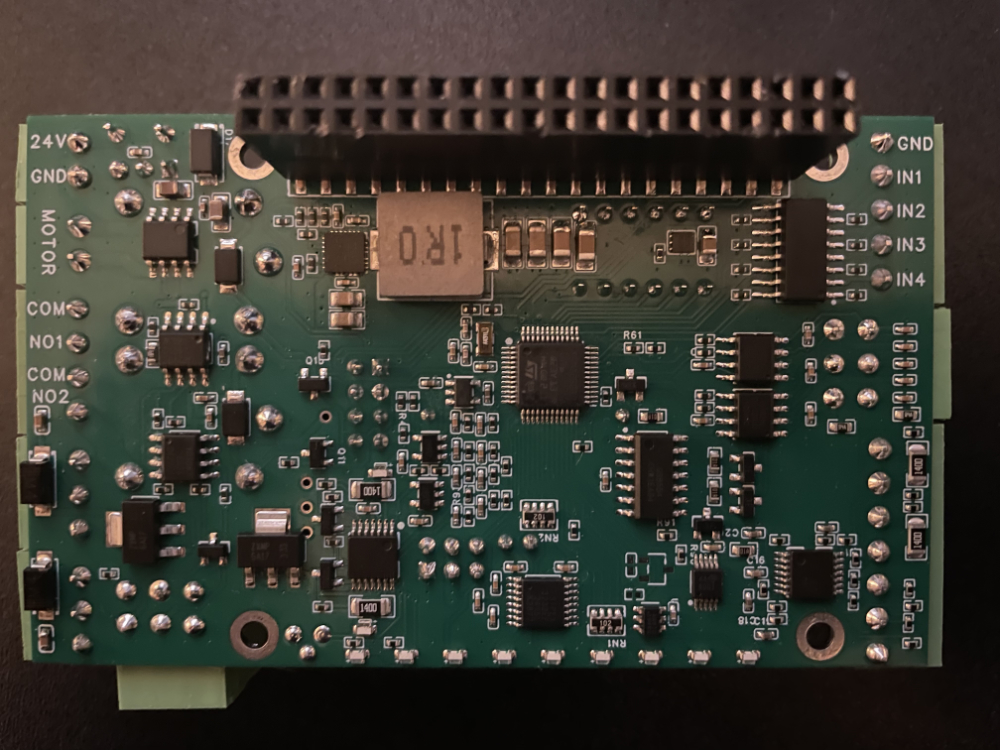
Hi,
I bought two boards and did some initial tests with them for a new project based on a Pi5. So far so good. I found the firmware update in the Git respository, and pushed the Update64 to start on the latest version of the software.
That also went through smoothly.
$ ./update64 0

You are ready to update the firmware on your board.

Your Raspberry Pi must be connected to the internet.

We strongly recommend to disconnect all outputs from the board since they can change state unpredictably.

Type "yes" (without quotes) to continue or anything else to quit:

yes

CPUID: 440073000350534d34313720

Downloading firmware...               Done

Programming the board...100%         Done
Unfortunately, the board is now no longer accessible (LED is off).
$ ./multiio -help board

Fail to read memory!

Multi-IO id 0 not detected
What can I do?
Best regards
Olaf
Hi Olaf,
The firmware update does not have to do that, there is something else that happens, are you sure you are running the update64 inside multiio-rpi repository?
Let me know if the card LED blinks at least once at power-up.
I will do the same with one card but we tested the firmware before releasing it.
Alex.
A couple of remarks: "multiio -help board" is not a valid command try "multiio 0 board" or type "multiio" for a list of the commands.
Could you tell me the version printed on the card? I tested the update with V2.0 and all is working fine.
Could you share the output of the "multiio -list" command?
Before the update:
hwspi@raspberrypi:~/Controller/potentiometer $ lsmod | grep i2c

i2c_brcmstb            49152  0

i2c_designware_platform    49152  0

i2c_designware_core    49152  1 i2c_designware_platform

i2c_dev                49152  0

hwspi@raspberrypi:~/Controller/potentiometer $ multiio 0 board

Firmware version 2.1, CPU temperature 44 C, Power source 3.30 V
Update:
hwspi@raspberrypi:~/Downloads/Software/multiio-rpi $ cd update/

hwspi@raspberrypi:~/Downloads/Software/multiio-rpi/update $ ls -l

insgesamt 44

-rw-r--r-- 1 hwspi hwspi   866 24. Jan 16:54 README.md

-rwxr-xr-x 1 hwspi hwspi 18140 24. Jan 16:54 update

-rwxr-xr-x 1 hwspi hwspi 19688 24. Jan 16:54 update64

hwspi@raspberrypi:~/Downloads/Software/multiio-rpi/update $ ./update64 0

You are ready to update the firmware on your board.

Your Raspberry Pi must be connected to the internet.

We strongly recommend to disconnect all outputs from the board since they can change state unpredictably.

Type "yes" (without quotes) to continue or anything else to quit:

yes

CPUID: 440073000350534d34313720

Downloading firmware...               Done

Programming the board...100%         Done
After the update:
hwspi@raspberrypi:~/Downloads/Software/multiio-rpi $ ./multiio 0 board

Fail to read memory!

Multi-IO id 0 not detected
As I said, I have a second board. It runs perfectly. But I don't want to risk it suffering the same fate with the same update... ;)
The PWR LED shows no reaction and does not flash.
Let me know the card hardware version, is printed on the top side of the card.
hwspi@raspberrypi:~/Downloads/Software/multiio-rpi $ ./multiio -list

0 board(s) detected
Please give me a picture of the bottom side of the card.
Thanks for the picture, nothing visually wrong with the card.
Could you run the update again after a repower?
Hi and thank you for the fast service. A new attempt to run update64 was successful.
Two other questions:
[LIST=1]
[*]on my one board I have installed Node-RED and am evaluating some inputs. The Node-RED nodes are missing in the
MULTI-IO Downloads. Will they be provided in the future?
[*]on my second board I am doing some experiments to control and visualise some things directly via Rust. Is there an overview of which registers the board writes the data to? I can't make any definitive sense of the data.h.
[/LIST]
It seems that the board uses /dev/i2c-13 and /dev/i2c-14 on a Raspberry Pi 5, but /dev/i2c-2 on a Raspberry 3.
Is there any additional information on this? That would be very helpful.
I have found data on the address base 0x06, for example:
Scanning I2C devices starting from base address: 0x06

...

Device found at address: 0x37

Register 0x00: value 0x28

Device found at address: 0x3a

Register 0x00: Value 0xb7

Device found at address: 0x4a

Register 0x00: Value 0x00

Device found at address: 0x4b

Register 0x00: Value 0x00

Device found at address: 0x50

Register 0x00: Value 0x00
Hi,
I am glad you fix it.
For the Node-RED you can use the "exec" node running the command line interface "multiio". Some customers believe it works a little faster than the JSON code of the native nodes. We plan to create the nodes but unfortunately, I can not give you a time frame.
The card uses "dev/i2c-1" for all Raspberry models as I know, at least this is the name in the command line interface uses, check the source code
comm.c, line 24.
The I2C address range is 0x06 to 0x0d for stack levels from 0 to 7.
Registers addresses are defined in an enum on
data.h starting from line 56. The address names are self-explanatory for us but I assume not for you. We did not have enough resources to document them. If you have questions about it I can answer.
Alex.