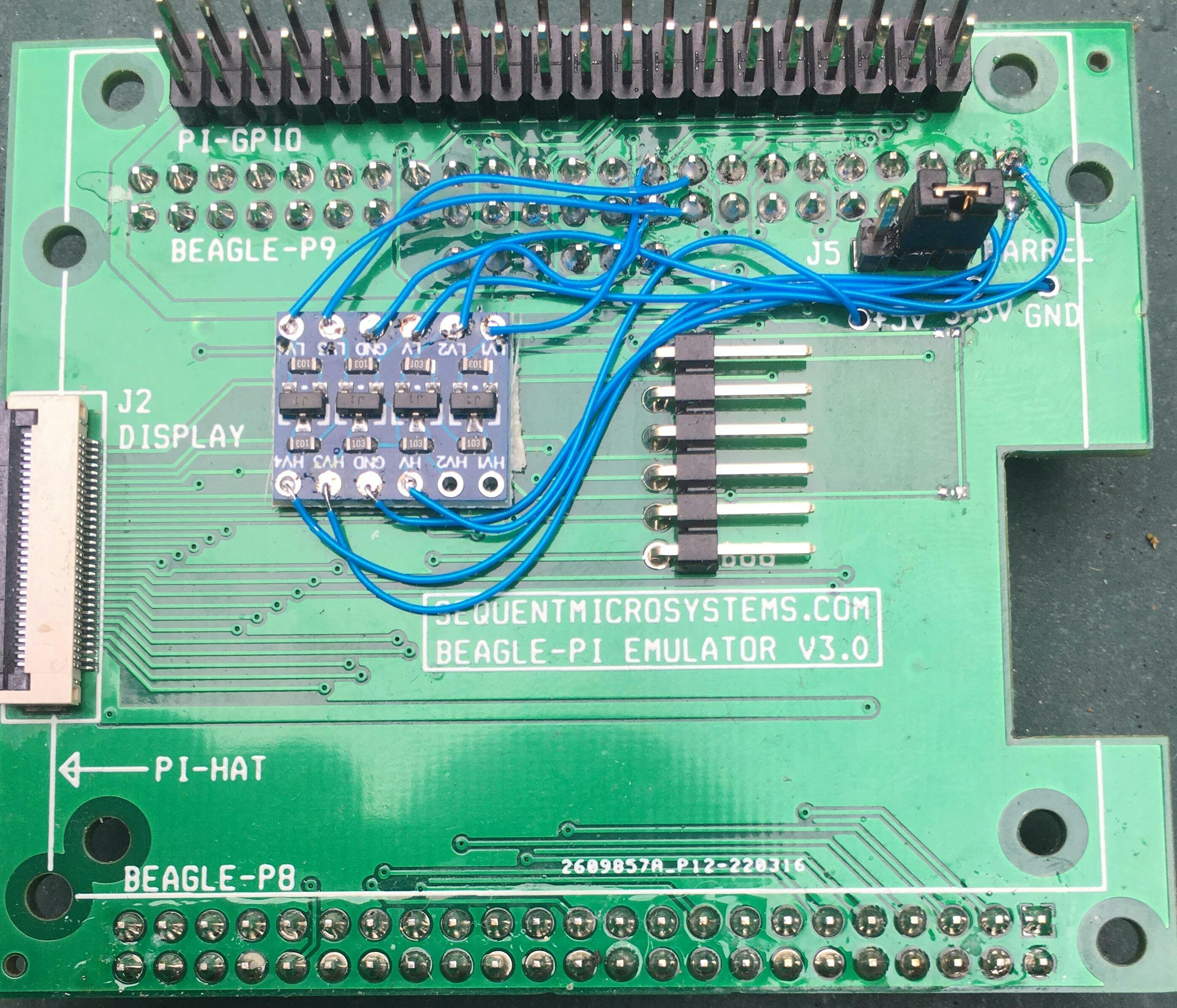
Beagle-Pi Raspberry Pi Emulator Using Beagle Bone Black
Replace Raspberry Pi with Beagle Bone: Map all GPIOs, I2C, SPI and UART ports; Runs Linux on internal Flash.
Overview
The Beagle-Pi is a passive adapter that lets you replace a Raspberry Pi with a BeagleBone Black, while keeping every Raspberry Pi HAT you already own.
- Maps all Raspberry Pi GPIO pins to the corresponding BeagleBone Black pins
- Maps I2C, SPI and UART to the corresponding BeagleBone ports
- Brings out the BeagleBone serial debug connector
- Includes a 30-pin FFC connector for an external display
- Runs all Raspberry Pi software: Command line, Python, Node-RED
- No SD card needed! Runs Linux on internal flash.
- Ambient operating temperature: -40°C to 85°C
Works with Open Automation Software
The BeagleBone Black runs the same software stack as a Raspberry Pi, so any Command Line, Python, or Node-RED project you've already built keeps working.

|

|

|
INTERFACES AND I/O
| I/O's | Communication | Software Integration |
|---|---|---|
| • All Raspberry Pi GPIO pins mapped 1:1 to BeagleBone pins | • I2C mapped to BeagleBone I2C port | • Command Line |
| • PWM-capable GPIO pins mapped to PWM-capable BeagleBone pins | • SPI mapped to BeagleBone SPI port | • Python |
| • Serial debug connector (J3) | • UART mapped to BeagleBone UART4 | • Node-RED (preinstalled on BeagleBone) |
| • 30-pin FFC display connector (J2) | ||
| Other Features | ||
| • No SD card needed — runs Linux on internal flash | ||
| • Selectable power source: barrel connector or USB (J5) | ||
| • Ambient operating temperature: -40°C to 85°C | ||
DESCRIPTION
BeagleBone cards are readily available, from $50 to $100. They have lots of GPIO pins, I2C, SPI and serial interfaces, and run Linux and Node-RED — so they can run all the same software as a Raspberry Pi. The Beagle-Pi is a passive adapter which maps all the Raspberry Pi GPIO pins to the corresponding pins on the BeagleBone Black interface.
All Raspberry Pi GPIO connector (J1) pins are mapped 1:1 to the corresponding BeagleBone Black pins. Any I/O board designed for the Raspberry Pi can be plugged into the Beagle-Pi adapter.
The I2C, SPI and serial ports are mapped to the identical interfaces on the BeagleBone. PWM-capable pins on the GPIO connector are connected to PWM-capable pins on the BeagleBone.
Connector J3 brings out the BeagleBone's serial debug port, and connector J2 brings out its display port through a 30-pin FFC connector for an external display.
The BeagleBone Black runs Linux directly from its internal flash memory, so no SD card is needed to boot or operate the system.
Connector J5 selects the source of power for the BeagleBone, from the barrel connector or the USB connector.
TECHNICAL DETAILS
CARD LAYOUT

The Beagle-Pi board plugs into the BeagleBone Black board using the P8 and P9 connectors, and emulates the Raspberry Pi GPIO connector J1. The adapter mounts on the BeagleBone card using the four outside holes. Raspberry Pi HATs can be plugged into the J1 connector and secured using the four inside holes.
GPIO MAP
The table below shows the correspondence between the Raspberry Pi GPIO pins and the BeagleBone pins.

POWER REQUIREMENTS
Power source: Connector J5 selects the source of power for the BeagleBone, from the barrel connector or the USB connector.
DEBUG & DISPLAY CONNECTORS
Connector J3 brings out the serial debug port of the BeagleBone. Connector J2 brings out the display port of the BeagleBone through a 30-pin FFC connector, for connecting an external display.
COMPATIBILITY
| Host board | BeagleBone Black |
| HAT compatibility | Any Raspberry Pi HAT can be plugged into the J1 GPIO connector |
| Ambient operating temperature | -40°C to 85°C |
DOWNLOADS
| User's Guide (PDF) | Schematics (PDF) | CAD | Software & Integrations |
|---|---|---|---|
| Open Source Hardware Schematic V2 | 2D CAD drawing | ||
| Open Source Hardware Schematic V3 |
PRESS
Beagle-Pi Emulator is a Raspberry Pi HAT adapter for BeagleBone Black
WHAT'S INCLUDED
| 1. Beagle-Pi Board |
|---|
 |
| 2. Mounting Hardware |
|---|
 |
QUICK START
- Plug the Beagle-Pi board onto the BeagleBone Black using the P8 and P9 connectors, and power up the system.
- To temporarily enable I2C on the BeagleBone, open a terminal and type:
config-pin P9.17 i2candconfig-pin P9.18 i2c. Depending on your OS, you might have to useconfig-pin p9-17 i2candconfig-pin p9-18 i2cinstead. - To enable I2C permanently at startup, edit the file
/etc/rc.localand add the same two lines above theexit 0line. - To use Node-RED, which comes preinstalled on the BeagleBone, add Node-RED to the I2C group:
sudo usermod -a -G i2c node-red. - The Raspberry Pi serial port on GPIO pins 8 and 10 is mapped to the BeagleBone UART4, which can be enabled by adding the following lines to
/etc/rc.local:config-pin p9.11 uartandconfig-pin p9.13 uart. Restart the BeagleBone after changing the file. - To check the available serial ports, type:
dmesg | grep tty.
Expand Your System
-
 In stock
DIN-RAIL Kit Type2 Perpendicular Mount for Raspberry Pi
Install Raspberry Pi and any number of HATs perpendicular to the DIN-Rail; One kit for up to 5 HATs. -
 In stock
Smart Fan HAT the Best Cooling Solution for Raspberry Pi
PWM controlled 40x40x10mm Fan keeps Raspberry Pi temperature constant; Stackable with any other HAT. -
 In stock
DIN-RAIL Kit Type1 Parallel Mount for Raspberry Pi
Install Raspberry Pi and multiple HATs parallel on the DIN-Rail; 90% rotation; Raspberry Pi 1 to 5. -
 In stock
Super Watchdog HAT with UPS Battery Backup for Raspberry Pi
Industrial-grade watchdog and UPS backup to keep your Raspberry Pi running safely.